# v1.2.0 - ItsAlwaysDNS

大家好！

距离上次发布已经有一段时间了。我们现在有了这么多很棒的功能,新版本的发布早就应该到来。但首先,要感谢所有贡献者和在 discord 服务器上提供想法、提交问题和参与讨论的人。让我们深入了解这些令人惊叹的新模块和功能的长列表,从我们的第一个重大公告开始。

<figure><img src="https://3879123134-files.gitbook.io/~/files/v0/b/gitbook-x-prod.appspot.com/o/spaces%2FFvLHMRHe72M9IZQAaCt9%2Fuploads%2Fgit-blob-bb8f5cd3864d4aa458ccb5cba9afd9e6574420f2%2Fthe-office.gif?alt=media" alt=""><figcaption><p>Woop woop</p></figcaption></figure>

## NetExec 已在 Kali 上可用:rocket:

最大的新闻是,在 [@arszilla](https://x.com/arszilla) 的巨大帮助下,这个版本也可以在 kali 上使用了。经过大约 3 个月的 Kali 端包更新,一切都已准备就绪。所以现在你可以直接用 apt 安装最新版本:

<figure><img src="https://3879123134-files.gitbook.io/~/files/v0/b/gitbook-x-prod.appspot.com/o/spaces%2FFvLHMRHe72M9IZQAaCt9%2Fuploads%2Fgit-blob-65b5aec12a3c18e8162cb2a80cb5e8880095383c%2Fimage%20(8).png?alt=media" alt=""><figcaption><p>使用 apt 安装 NetExec</p></figcaption></figure>

## 总是 DNS ...

... 这就是为什么我们现在有了完全集成的 DNS 选项,感谢 [@XiaoliChan](https://x.com/Memory_before)！你可以使用 `--dns-server` 指定 DNS 服务器,或使用 `--dns-tcp` 强制使用 TCP 进行 DNS。这也允许你使用 `-6` 强制使用 IPv6,并使用 `--dns-timeout` 设置 DNS 超时。

![指定 dns 服务器](https://github.com/Pennyw0rth/NetExec-Wiki/assets/50464194/42925ec8-c693-48ae-9c02-bb4ef27a1b0a)

## 是时候收集凭证了💰

听说过 SCCM 吗？你现在可以使用新的标志 `--sccm` 导出所有由 DPAPI 存储的 SCCM 凭证。此外还有很多新模块可以获取各种软件存储的凭证,如 MobaXterm、mRemoteNG、一些 vnc 服务器软件和 Google Refresh Tokens,感谢 [@zblurx](https://x.com/_zblurx)！

<figure><img src="https://github.com/Pennyw0rth/NetExec-Wiki/assets/50464194/5301e0f8-39cf-4716-894f-75e8bd197f40" alt=""><figcaption><p>Looting SCCM</p></figcaption></figure>

<figure><img src="https://github.com/Pennyw0rth/NetExec-Wiki/assets/50464194/be55049d-45cf-4b52-be81-502c2b6e0013" alt=""><figcaption><p>Looting MobaXterm</p></figcaption></figure>

<div data-full-width="false"><figure><img src="https://github.com/Pennyw0rth/NetExec-Wiki/assets/50464194/3b919e10-6b67-414e-af11-000645e33d4e" alt=""><figcaption><p>Looting mRemoteNG</p></figcaption></figure></div>

<figure><img src="https://github.com/Pennyw0rth/NetExec-Wiki/assets/50464194/ced41d32-e8ba-4463-af77-d2ce0d9801e8" alt=""><figcaption><p>Looting VNC</p></figcaption></figure>

## Looting PuTTY

此外,感谢 [@NeffIsBack](https://x.com/al3x_n3ff) 的贡献,现在也可以获取存储在 PuTTY 中的凭证和 RSA 私钥。

<figure><img src="https://github.com/Pennyw0rth/NetExec-Wiki/assets/50464194/0dd0c207-b244-4244-8668-f7587602453b" alt=""><figcaption><p>从 PuTTY 获取 RSA 私钥和代理凭证</p></figcaption></figure>

## Extract obsolete operating systems from LDAP

使用新的 LDAP 模块 `-M obsolete`,你可以查询 LDAP 中的过时操作系统！由 [@Shad0wC0ntr0ller](https://x.com/Shad0wCntr0ller) 开发。

## New LDAP flag for retrieving active Users on the Domain

新的 LDAP 标志 `--active-users` 与 `--users` 具有相同的用途,但会过滤掉已停用的账户。由 [@termanix](https://github.com/termanix) 开发。

## New SMB Module Printerbug

现在可以使用 NetExec 利用著名的 Printerbug 强制认证技术,滥用 MS-RPRN！由 [@lodos2005](https://github.com/lodos2005) 开发。

<div data-full-width="false"><img src="https://github.com/Pennyw0rth/NetExec-Wiki/assets/50464194/94a83b39-5bec-4934-931b-e33353dc4529" alt="Coercing authentications using NetExec and the new Printerbug module"></div>

![Relaying the incoming connection](https://github.com/Pennyw0rth/NetExec-Wiki/assets/50464194/bd0f18e7-3a94-421b-b763-1fc7445e7c60)

{% embed url="<https://www.thehacker.recipes/ad/movement/mitm-and-coerced-authentications/ms-rprn>" %}

## 使用 SMB 寻找 ADCS

现在有一个新的 SMB 模块,可以枚举 certsrv.exe 的 DCERPC 端点,表明服务器是一个 CA。它还会枚举 CA 是否容易受到 ESC8 的攻击。由 [@0xjbb](https://github.com/0xjbb) 开发。

![使用 SMB DCERPC 寻找 ADCS](https://github.com/Pennyw0rth/NetExec-Wiki/assets/50464194/babcd4a5-c96d-4705-b164-d205e0f1b685)

## 新的 LDAP 模块枚举 userPassword 和 unixUserPassword 属性

有些软件会在 LDAP 属性 `userPassword` 和 `unixUserPassword` 中填充可能的明文凭证。新的 LDAP 模块 `-M get-userPasswsord` 和 `-M get-unixUserPassword` 将查询所有用户的这些属性。由 [@Syzik](https://x.com/SyzikSecu) 开发。

![image](https://github.com/Pennyw0rth/NetExec-Wiki/assets/50464194/a01986e8-62ee-496f-ae92-6cfc168a1f31)

## 新的 Winlogon 自动登录模块

Windows 允许配置在启动时自动登录机器的用户。使用 [@swisskyrepo](https://x.com/pentest_swissky) 开发的新 SMB 模块,你现在可以获取存储在注册表 `HKLM\Software\Microsoft\Windows NT\CurrentVersion\Winlogon` 中用于该登录过程的键值 **DefaultDomainName、DefaultPassword、DefaultUserName、AutoAdminLogon** 的内容。

![从注册表获取自动登录凭证](https://github.com/Pennyw0rth/NetExec-Wiki/assets/50464194/dcaf5906-db93-409a-9937-dbf82ca728b6)

{% embed url="<https://learn.microsoft.com/en-us/troubleshoot/windows-server/user-profiles-and-logon/turn-on-automatic-logon>" %}

## 原始 LDAP 查询

现在有一个新的 LDAP 标志 `--query "(Object)" "Filter"`,使用标准的 ldapsearch 语法可以快速查找 LDAP 中的属性。由 [@NeffIsBack](https://x.com/al3x_n3ff) 开发。

![image](https://github.com/Pennyw0rth/NetExec-Wiki/assets/50464194/145e0573-bf1e-4e18-971b-3f098506c8e3)

## 更新的 LDAP 和 SMB 用户枚举

SMB/LDAP `--users` 和 LDAP `--active-users` 标志现在允许过滤特定用户！感谢 [@Marshall-Hallenbeck](https://x.com/MJHallenbeck)。

<div data-full-width="false"><img src="https://github.com/Pennyw0rth/NetExec-Wiki/assets/50464194/f191bd1f-af45-4cdc-bd84-e82b74bff502" alt=""> <img src="https://github.com/Pennyw0rth/NetExec-Wiki/assets/50464194/e2c4e3eb-ec14-42a7-a895-2df852d2cfe1" alt=""></div>

![](https://github.com/Pennyw0rth/NetExec-Wiki/assets/50464194/28d9208f-b7be-4f06-9505-d1b76e6b4201)

## 更新的 PSO 模块

[@sebrink](https://x.com/_sandw1ch) 更新了 pso 模块,该模块可以获取域中所有细粒度密码策略,为模块带来了全新的外观,并修复了一个关键 bug - 如果策略附加到多个对象,该策略不会显示。

![新的 pso 模块](https://github.com/Pennyw0rth/NetExec-Wiki/assets/50464194/899e73df-e4b0-4db6-9de1-2527bff470d2)

## 身份验证限流

旧的 `--jitter` 选项已重新设计,以启用身份验证限流。如果你想更加隐蔽或绕过锁定机制,这非常有用。由 [@NeffIsBack](https://x.com/al3x_n3ff) 开发。

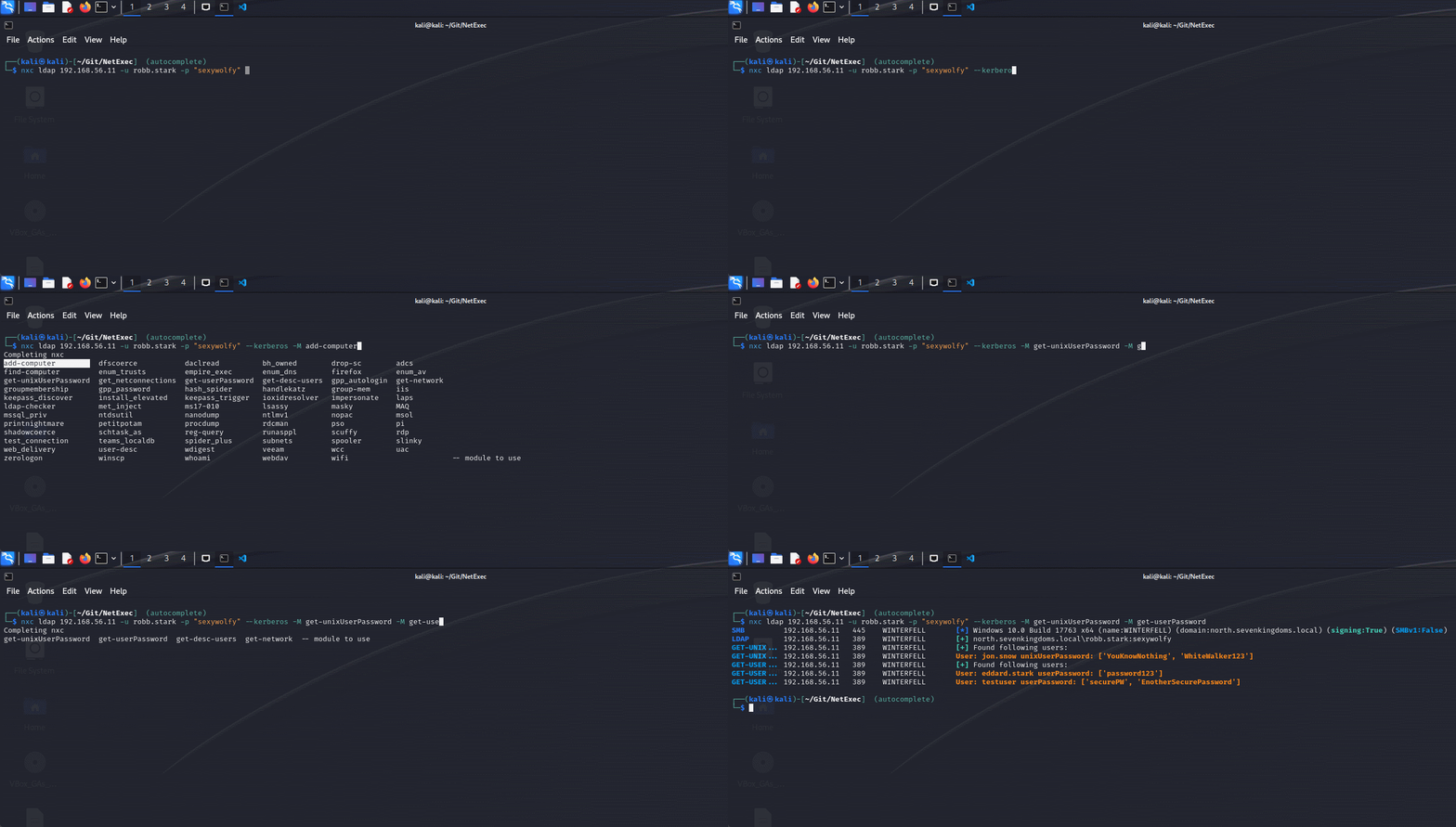
## Tab 补全

感谢 [@Adamkadaban](https://x.com/Adamkadaban),如果使用 pipx 安装,NetExec 现在支持 tab 补全！查看安装页面了解设置。

<figure><img src="https://3879123134-files.gitbook.io/~/files/v0/b/gitbook-x-prod.appspot.com/o/spaces%2FFvLHMRHe72M9IZQAaCt9%2Fuploads%2Fgit-blob-64a9d145ab9c1eb5da4f6a848c4e0b27bbe66143%2Fnxc-argcomplete.gif?alt=media" alt=""><figcaption><p>使用 NetExec 的 Tab 补全</p></figcaption></figure>

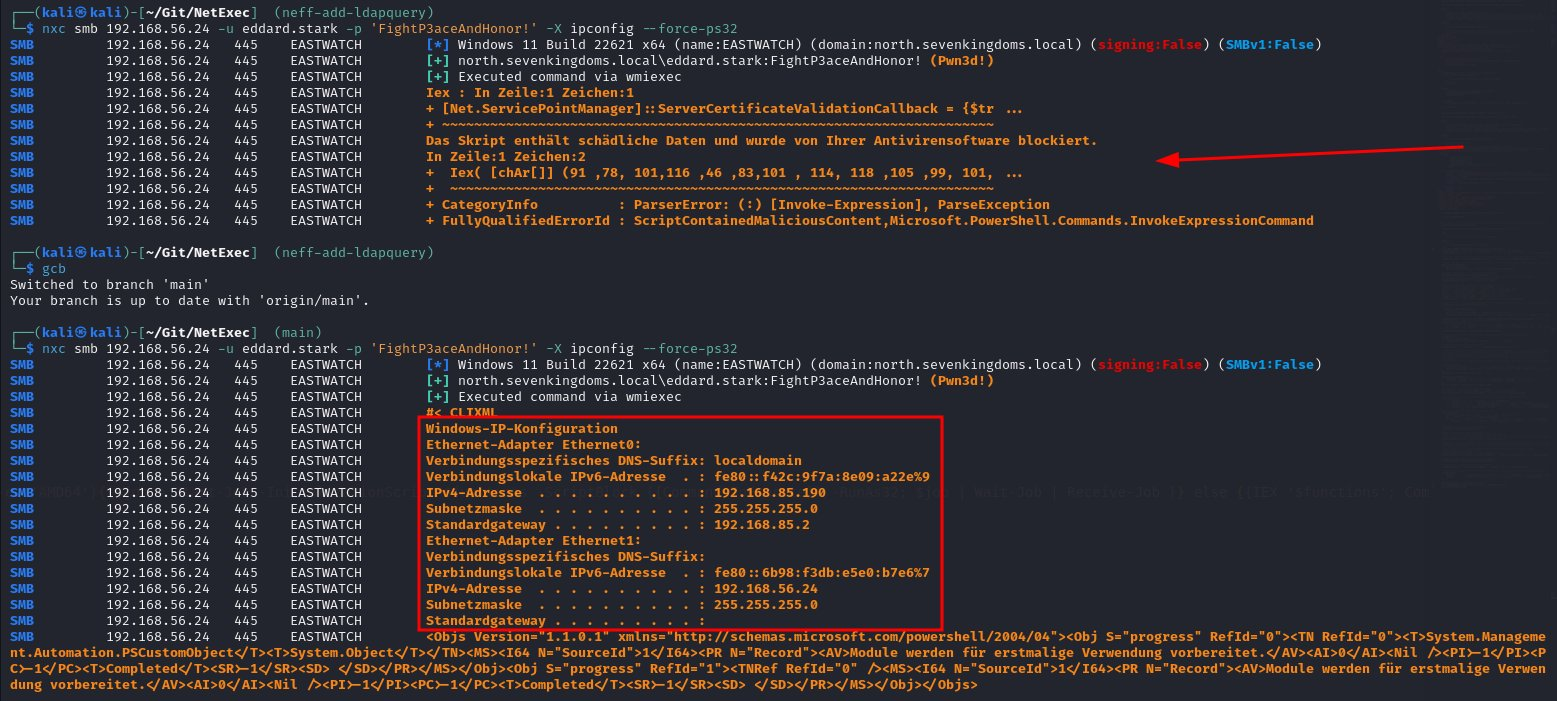
## PowerShell 命令执行重构

对 NetExec 中的 PowerShell 功能进行了重大改进,修复了大多数 bug 并改进了整体可用性和稳定性。混淆和 Amsi 绕过也被设置为非默认,因为它们经常被杀毒软件标记。一个很好的副作用是 `ps32` 降级现在可以绕过 Windows Defender😄\
由 [@Marshall-Hallenbeck](https://x.com/MJHallenbeck) 开发。

<figure><img src="https://3879123134-files.gitbook.io/~/files/v0/b/gitbook-x-prod.appspot.com/o/spaces%2FFvLHMRHe72M9IZQAaCt9%2Fuploads%2Fgit-blob-9563e6a773e514d3d6cc99ed2a6f8398482c5b0e%2Fimage.png?alt=media" alt=""><figcaption><p>使用 --force-ps32 绕过 Windows Defender</p></figcaption></figure>

## 结语

如果你想详细了解所有更改或下载最新的独立二进制文件,请查看 github 页面:

{% embed url="<https://github.com/Pennyw0rth/NetExec/releases/tag/v1.2.0>" %}